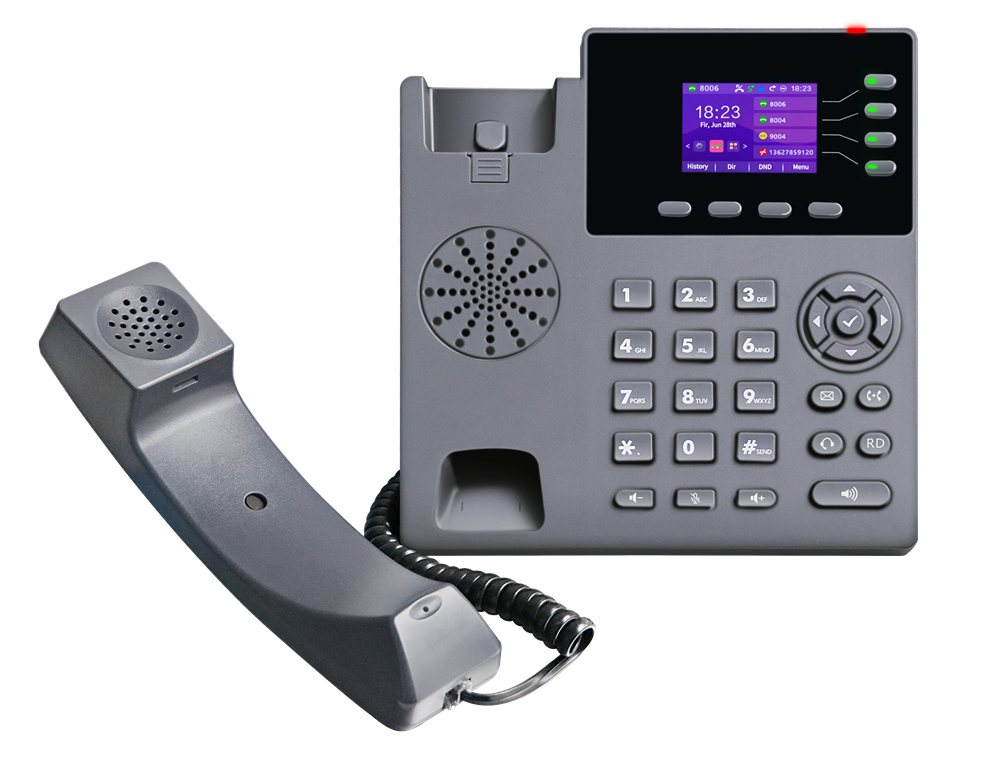
Desk phones are easy to install where the network reaches — and painful where it does not. A WiFi IP phone removes that constraint: the SIP-T790PWN registers to your PBX over the air (2.4 GHz by default) or over a standard Ethernet cable, and with four SIP accounts it can serve a desk, a manager’s line and a shared hot desk at the same time.
This guide covers what the SIP-T790PWN offers, where it makes practical sense, and the specifications that matter when you compare it with other business IP phones.
What an IP phone does that an analog phone cannot
An IP phone is a computer that makes calls. Instead of receiving dial tone from the carrier, it registers to a SIP platform and carries voice as data. That architecture is what gives you voicemail-to-email, call recording, BLF presence, five-party conferences, and centralised configuration across hundreds of handsets.
The trade-off has always been infrastructure: a PoE switch port and a cable to every desk. WiFi-capable IP phones change the maths — especially in buildings where pulling cable is expensive, slow, or forbidden by the lease.
Key features of the SIP-T790PWN
Colour display and programmable keys. A 2.4-inch colour LCD shows call information and icons clearly, paired with four bi-colour programmable line keys (with LED indicators) plus four customisable soft keys. The one-touch electronic page-turning replaces paper labels — a small detail that saves real time when extensions change.
4 SIP accounts. Four independent SIP lines on one handset cover the common office patterns: a direct line, a shared department line, a second site, and a hotline or overflow line. Each line has its own LED state, so presence is visible at a glance.
HD audio with noise reduction. HD handset and HD hands-free with advanced noise reduction, supported by broadband codecs G.722 and Opus, plus narrowband G.711(A/μ), G.723.1, G.729AB, G.726 and iLBC. Full-duplex hands-free, acoustic echo cancellation, VAD, comfort noise generation, packet-loss compensation, automatic gain control and a dynamic jitter buffer up to 300 ms keep calls clean on real-world networks.
Security that stands up to scrutiny. Encrypted conversations via OpenVPN, TLS and SRTP, HTTPS certificate management, SIP over UDP/TCP/TLS, and a SIP trust server anti-attack mechanism. For finance, healthcare and legal teams, that is usually the first line item on the requirement list.
Handling real office call flows. Five-party conference, call hold, mute, blind and inquiry transfer, DND, call forwarding, call waiting, call park and pickup, call recording triggered from the server, multicast paging, intercom, direct IP calls, hotline and speed dial, BLF monitoring, text messaging and emergency call.
Address book and history. 1,000 local contacts, blacklist, XML/LDAP directory, smart contact search, contact import/export, and 1,200 call records combining dialled, received, missed and forwarded calls.
Provisioning and management. Web configuration, phone configuration, automatic deployment over FTP/TFTP/HTTP/HTTPS, SIP PnP or TR-069, BIN/CFG import-export, CSTA remote control, packet capture and diagnostics — the toolset that lets an IT team roll out fifty phones without touching each one.
Networking, power and installation
The dual Ethernet ports matter more than they look: the phone can sit between the wall socket and a PC, passing data through while taking power from the PoE switch — one cable, no power adapter, no extra switch port.
Where it fits
- Branch and satellite offices — standardise on one handset model across sites that use different uplinks.
- Hot desks and shared offices — a phone that follows the user’s extension, not the desk’s cable.
- Retail, clinics and reception — a colour screen and BLF keys give staff instant visibility of which lines are busy.
- Leased buildings and fit-outs — no new cabling means the phone system ships in days, not weeks.
- Hybrid deployments — sit alongside analog gateways: IP phones on the network, legacy analog handsets kept alive on FXS ports, carrier lines terminated on FXO ports, all managed by the same IP-PBX.
FAQ
Q1. Does the SIP-T790PWN need a cable, or does it work purely over WiFi? It supports both. WiFi (2.4 GHz by default) means no network cable is required; the dual 10/100 Mbps ports allow a conventional wired connection with PoE, and can pass through a PC connection.
Q2. Why would I need 4 SIP accounts on a single desk phone? Common cases: a direct line plus a shared department line, a second office or branch number, an overflow/hotline line, and separation between internal and external identities. Each account gets its own line key and LED state.
Q3. Is the phone secure enough for finance and healthcare environments? It supports OpenVPN, TLS and SRTP encryption, HTTPS certificate management, 802.1X, SIP trust server anti-attack, and configuration file encryption.
Q4. How do I roll out many phones without configuring each one? Automatic provisioning is supported through FTP, TFTP, HTTP, HTTPS, SIP PnP and TR-069, with BIN/CFG configuration import and export, plus CSTA remote control.
Q5. Does it work with my existing IP-PBX or hosted VoIP service? Yes — it implements SIP v1/v2 (RFC 2543 / RFC 3261) with redundant server support, and is compatible with mainstream IP-PBX platforms and enterprise network management systems.
Q6. Can I use a headset? Yes. There is a dedicated RJ-9 headset port in addition to the RJ-9 handset port, with handset, hands-free and headset modes available.
The bottom line
The SIP-T790PWN is a practical answer to a specific problem: a business-grade desk phone for sites where cabling is the bottleneck, without giving up colour display, HD audio, four lines, encryption or centralised provisioning. If your rollout is blocked on cable pulls, a WiFi IP phone unblocks it today — and if the site later gets structured cabling, the same phone runs on PoE without any reconfiguration of the platform.
VINTelecom supplies the SIP-T790PWN together with the IP-PBX platforms and gateways it registers to, so extensions, gateways and carrier lines can be planned as one system.